

What Is an AI Chatbot — And Why Is It Different From the Old Kind?
It understands your customers the way they actually write.
You've probably met the old kind of chatbot: the one that says "I didn't understand that" the moment you go off-script. A modern AI assistant is trained on your products, prices, policies, and common questions, and it reads messages the way people really write them, typos and shorthand included. Fernvay sets up assistants for WhatsApp, your website, SMS, and Instagram and Facebook messages, plus AI voice agents for your business phone.

What your assistant can do
It works the inbox. You stay in charge.
Every assistant we build runs on the same platform, set up under the Fernvay name and tuned to your business. Here’s what it can do once it’s live.
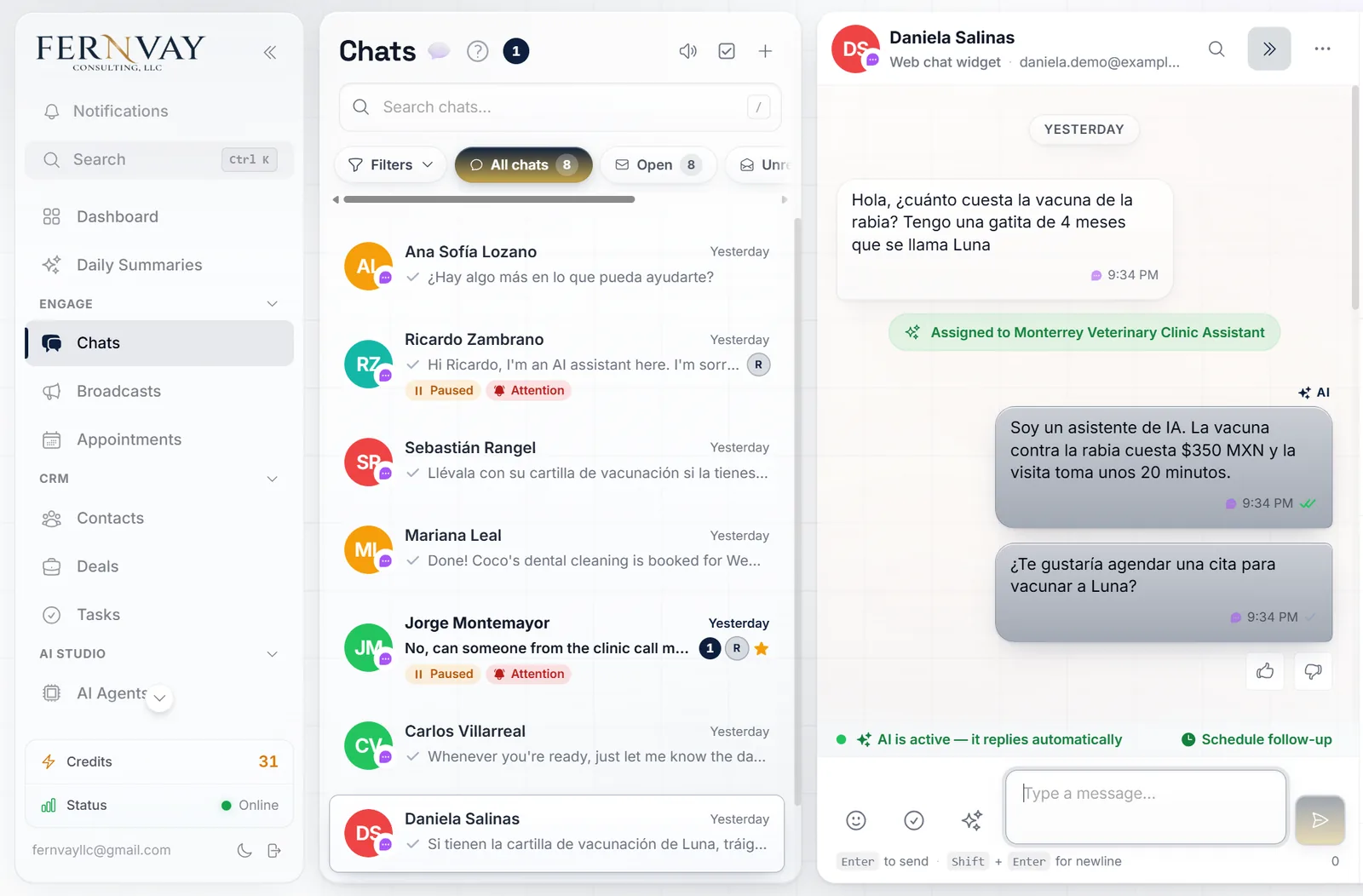
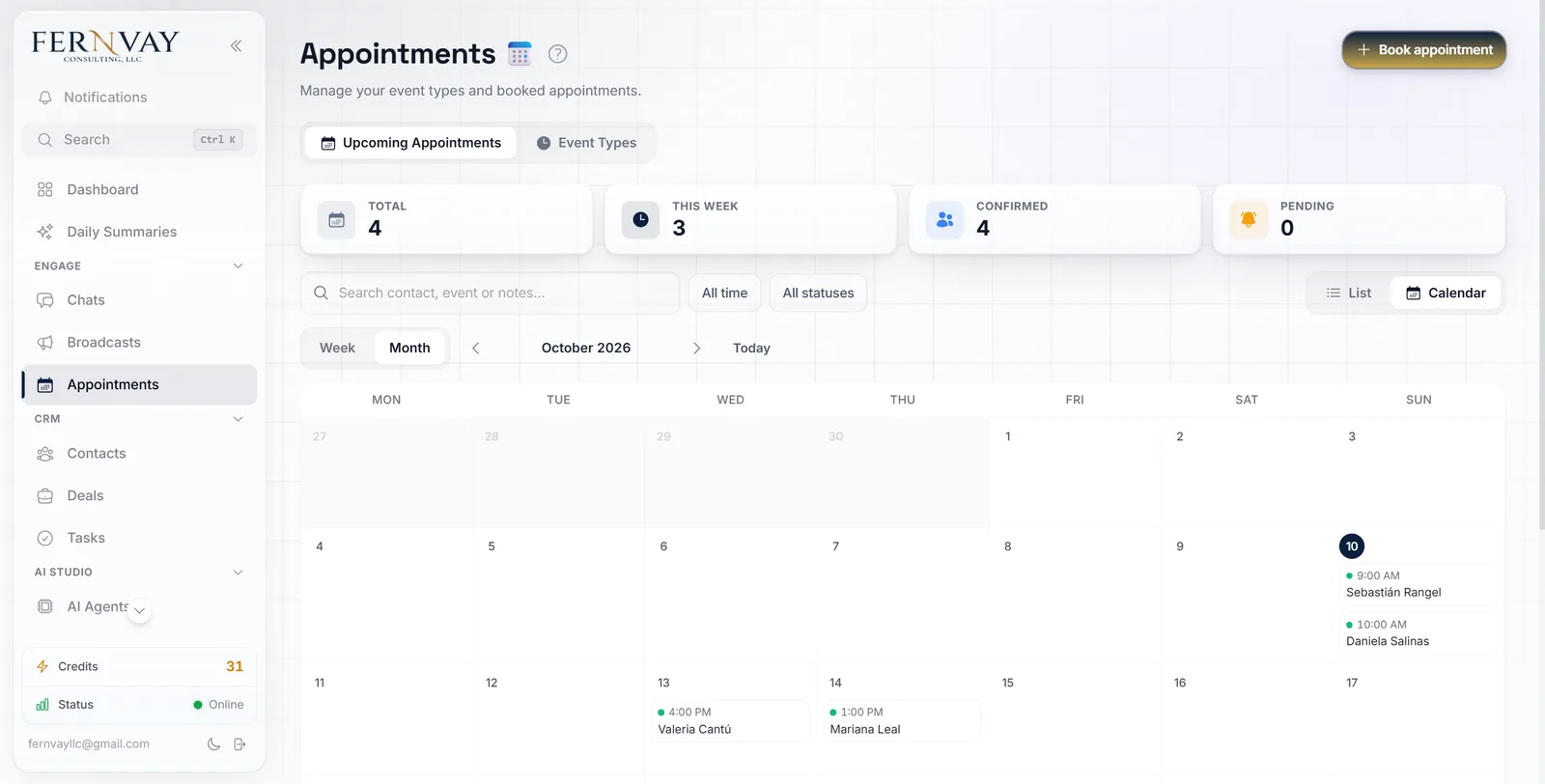
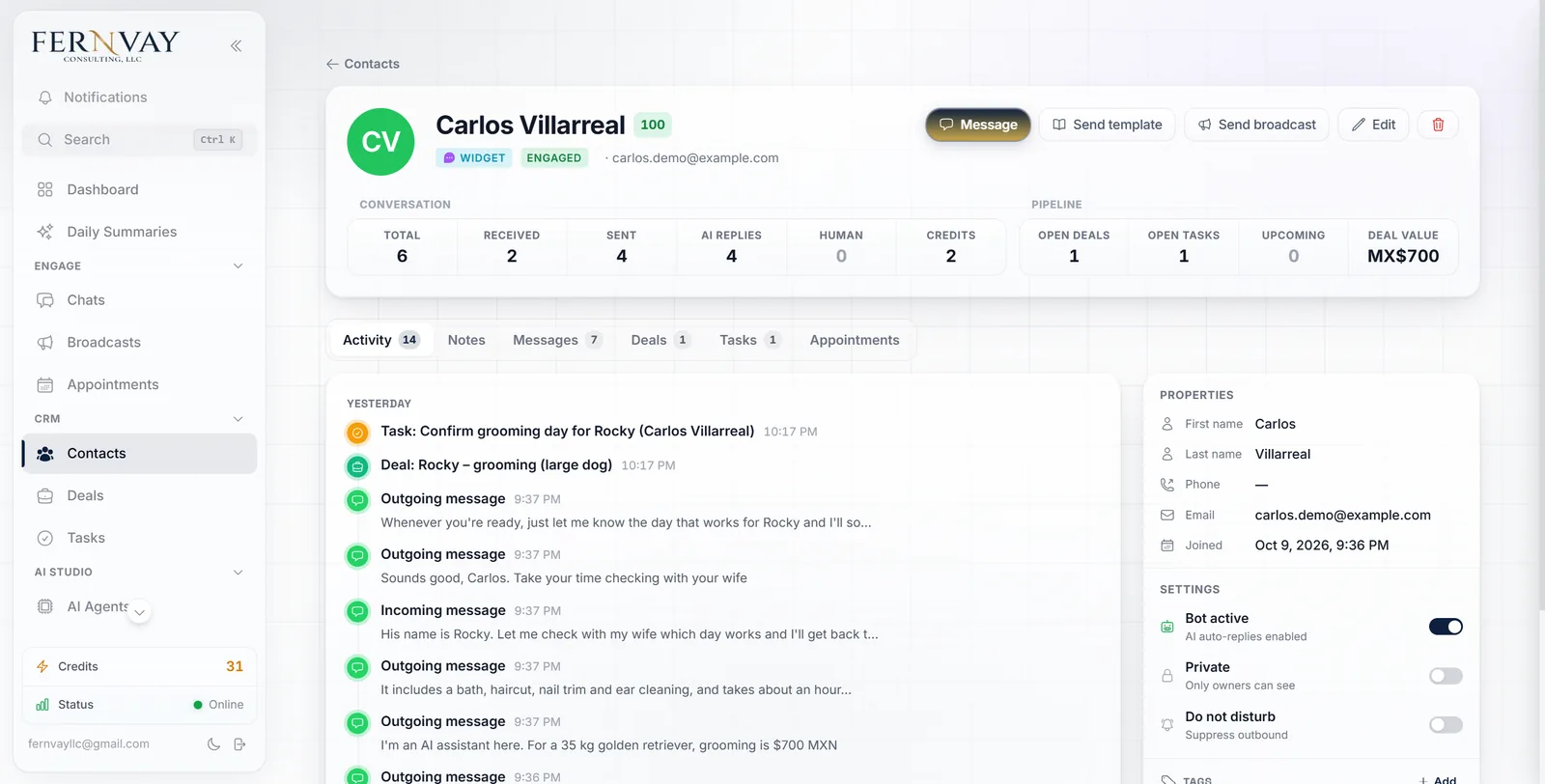
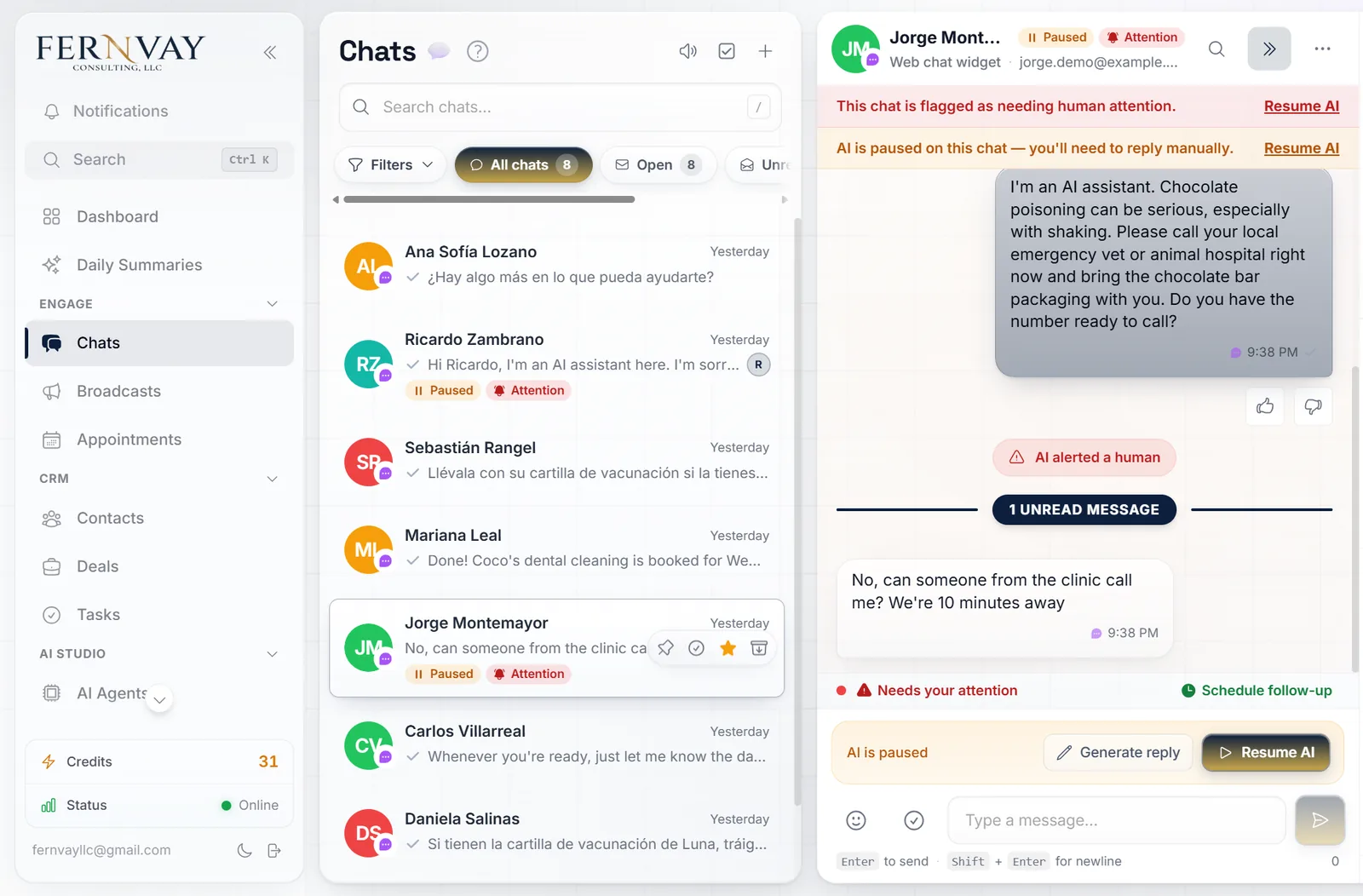
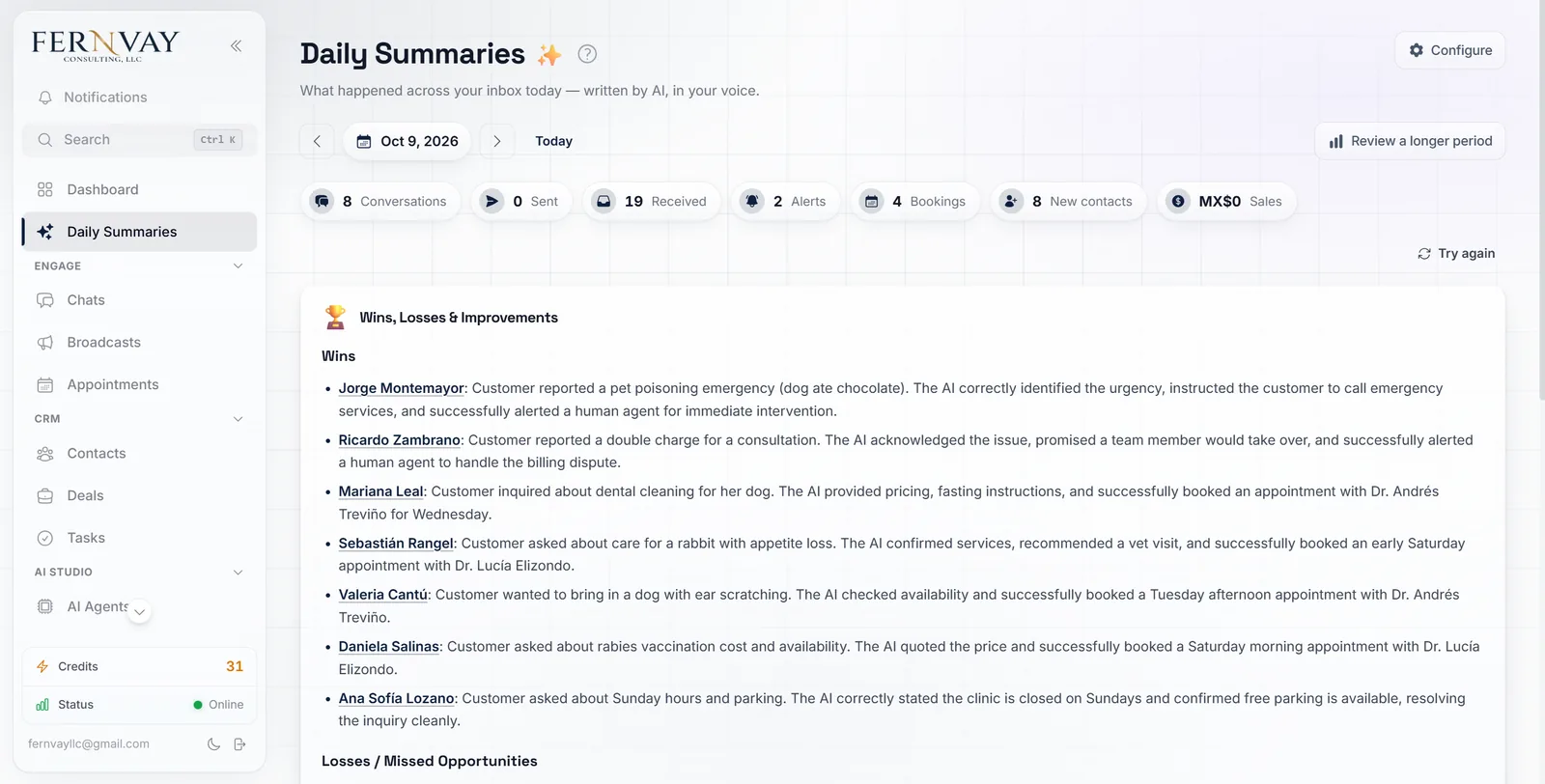
Screens are from our demo account, a fictional veterinary clinic in Monterrey. Names, conversations and numbers are examples.
Answers everywhere, from one inbox
WhatsApp, your website chat, Instagram and Facebook messages, text messages and email all land in one inbox, on desktop and on your phone. The assistant answers in seconds, in English or Spanish, at any hour. It can also answer comments on your posts by sending the person a private message.
Books appointments inside the chat
When someone asks for a time, the assistant checks your real availability, offers open slots and books the one they pick, without sending them anywhere else. Each service has its own length and hours, each person on your team can keep their own schedule, and bookings can go straight to your Google Calendar. You also get a booking link you can put on your website or Instagram bio.
Follows up so nobody goes cold
If someone stops replying, the assistant follows up on its own. You can send reminders and announcements to customer lists, and answer people who fill in your Facebook or Instagram lead forms the moment they submit. Anything a customer mentions in the chat, like their address or their pet’s name, is saved to their contact.
Hands off when it should
You decide what the assistant handles and what comes to you: a complaint, a large order, a payment to confirm. When it hands a conversation over, it stops replying, you get an alert, and the whole conversation is there for whoever picks it up. Chats can be assigned to specific people on your team.
Tells you what happened
Every morning you get a summary of the day before: new bookings, sales, conversations that need a person, and how customers felt. A sales pipeline and a task board keep track of every open opportunity and to-do.
Also included
- Sends photos, videos, PDFs and voice notes at the right moment: your price list, a map to your location, a photo of what they asked about.
- Understands the photos and voice messages customers send, so they can show the problem or talk instead of typing.
- Replies in each customer’s own language, and its follow-ups stay in that language.
- Works the hours you choose, or around the clock.
- Filters out spam so it doesn’t waste replies.
- Keeps chosen contacts away from the assistant, like family, suppliers or VIP clients you answer yourself.
- Tags and organizes contacts into lists you can message later.
- Respects quiet hours, so reminders and announcements don’t go out at night.
- Shows which Facebook or Instagram ad started each WhatsApp conversation.
- A private test chat to try every answer before it talks to customers.
- Installs on your phone like an app.
- Connects to your other tools through webhooks and an API.
Works with: WhatsApp · Instagram · Facebook Messenger · Text messages (SMS) · Email · Website chat · Telegram · Google Calendar · Facebook lead forms. Other tools connect through the API and webhooks.
Two Options, One Goal: Never Miss an Inquiry
Text Chatbots
Text assistants answer on WhatsApp, your website chat, SMS, and Instagram and Facebook messages. They reply in seconds, in English or Spanish, answer questions, and move the customer toward an order or a booking.
AI Voice Agents
AI Voice Agents answer your business phone. When a call comes in — whether you’re on another call, on a job site, or it’s 11pm — the voice agent picks up, handles the conversation naturally, and either resolves the inquiry or schedules a callback. It sounds professional, responds intelligently, and never puts a caller on hold.
Both integrate directly with your CRM and booking calendar. Fernvay builds and configures both — you choose what fits your business, or we recommend the right combination based on how your customers typically reach you.
Built for Businesses Where Every Message Can Be a Sale
An assistant pays off where customers ask a lot of questions before they buy: online stores, service businesses, anything sold over WhatsApp or direct messages. It helps less where every sale is a long, one-to-one relationship. There, it's better at taking the first inquiry than at closing.
Businesses we work with include:

Coaching and consulting

Home services

Legal and financial services

Healthcare and wellness

Other Small Businesses

Real estate and mortgage
If your business runs on appointments, service calls, or consultations — and you're currently handling all inbound manually — an AI chatbot is a direct upgrade to your intake process.
Is this the right fix?
Three questions before you build.
We score every workflow on three questions: how often it happens, how often it goes wrong, and what's at stake when it does. Here's how an AI assistant usually scores.
How often it happens: High
Where customers ask questions before they buy.
How often it goes wrong: Often
After hours and on weekends, when nobody's there.
What's at stake: Low
For common questions. Orders, complaints, and payments go to a person.
Worth building when the same questions arrive every day.
When not to build it
If you get a handful of messages a week, answer them yourself. If the first conversation is the sale, an assistant should take the inquiry, not try to close it. And if your prices, stock, and policies aren’t written down anywhere, we write them down first; the assistant is only as good as what it’s trained on.
Done for You — We Handle the Entire Setup
You don't need to be technical, and you don't need to write a single line of code. Here's how the process works:
Step 1 — Review
We look at how inquiries reach you, what customers ask most, and whether an assistant is the right fix.
Step 2 — Build
We set up the assistant and connect your calendar, CRM, website, or phone system, including the move to the official WhatsApp Business API without losing your contacts or chat history.
Step 3 — Test
We test it against real messages from your customers, typos and shorthand included, before it talks to anyone.
Step 4 — Launch
Most assistants are live within 10 business days of kickoff. Your part takes about one working day: loading your information, a first round of training, and testing.
Step 5 — Optimize
You rate answers with a thumbs up or down, and the assistant adjusts without rewriting everything. When something breaks, we fix it fast.
You're involved at the beginning to share your business knowledge. After that, we handle the rest.
Case Study: Alier, After Hours

Alier sells adult diapers and absorbent pads online across Mexico. Orders came in through one WhatsApp line, answered by one person starting at 8:30 a.m. Messages sent at night waited until morning. Weekend messages waited until Monday, when clearing the backlog took up to three hours and pulled extra people off packing orders.
Here's what changed after the assistant went live:
A Sunday sale, start to finish
A new customer asked about prices and completed a paid order in 25 minutes. No one from the team was involved.
A wholesale account, found after hours
A veterinary hospital asked about 700 absorbent pads a month outside business hours. The assistant sent it to the sales inbox. It closed, and they've since reordered.
Nights and weekends answered
Messages that arrive at night or on weekends now get an answer in seconds, instead of waiting until morning, or Monday.
Problems flagged, not lost
When a coupon fails or checkout breaks at night, the assistant tells the customer they're a priority and flags it for the team.
What it doesn’t do yet: when the assistant hands a conversation to the team, someone still has to follow up. We’re adding a midday reminder for anything left unanswered.
Find Out What's Happening to Your After-Hours Messages
Book a free Workflow Review with Fernvay Consulting. We’ll look at how inquiries reach you today, show you what a chatbot would handle, and tell you honestly whether it’s the right fix for your business.
No obligation. No technical knowledge required. Just a straightforward conversation about whether this is the right fit for your business.